
iPhones Update
iPhone Unlock Software: 3 Best Tools to Unlock iPhone in 2026
Have you ever been stuck in a locked iPhone by accident? That’s frustrating; it can be a screen lock, activation lock, iPhone unavailable, stuck on logo, etc. And you have no clue how to deal with this we’ll we are here to help you with the best iPhone unlock software so you don’t have to pay anyone to fix your phone.
Fake: “Activation Lock problem only removed by screen passhash tool.” When you forget your iPhone/Windows lock screen password, you need a removal tool to gain access to the circumstances that arise.
That’s why you need more than just searching for the tool with the longest feature list when looking for iPhone unlock software. You have to determine first if the restriction is on your iPhone and then see if the software actually supports your device and IOS version.
This post includes comparisons of three hot iPhone unlock tools: Dr.Fone – Screen Unlock (iOS), Tenorshare 4MeKey, and iMyFone LockWiper. We will describe what each tool is intended for, its advantages and disadvantages, and which scenario the respective solution fits best.
What Is iPhone Unlock Software?
What Is iPhone Unlock Software? Assuming iPhone unlock software is a family of desktop tools mainly used to recover lost access on iPhones that are blocked by some locks or controls.
In these types of applications, your iPhone first gets connected to a Windows PC or Mac, after which you will be guided through a recovery procedure that helps with unlocking.
But there is a key difference.
One solution does not fit all iPhone locks.
Note that forgetting your screen passcode is a different problem than an Activation Lock. Identify the problem first in order to buy any software for unlocking.
Best iPhone Unlock Software
The following three tools each have their respective strengths. Instead of designating one program as “the best” for all situations, it is smarter to apply the right tool to the question you are trying to answer.
Dr.Fone – Screen Unlock
Best for: Users looking for a broader iPhone unlocking and recovery toolkit.
Dr.Fone – Screen Unlock from Wondershare is the most versatile option in this comparison because its current iOS product page advertises several different unlocking-related functions.
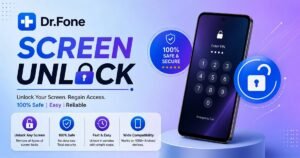
Wondershare currently lists support for screen passcodes, Face ID and Touch ID-related screen locks, Screen Time, Apple ID-related functions, Activation Lock, MDM restrictions, and SIM/carrier unlocking. Its current page also advertises support extending to newer iOS releases, including iOS 26.
That broad feature set makes Dr.Fone worth considering when you are not dealing with a single straightforward lock.
Key Features
- Screen passcode removal
- Face ID and Touch ID-related screen unlocking
- Screen Time passcode removal
- Apple ID-related unlocking functions
- Activation Lock-related functionality
- MDM restriction removal
- SIM/carrier unlocking functions
- Windows and Mac support
The exact process and results depend on the device, iOS version, and type of lock involved. Check compatibility before starting an unlocking operation.
Screen Passcode
It also covers Face ID, Touch ID, and disabled-device scenarios. This can be useful when the problem is simply access to the device rather than ownership-related Activation Lock.
Screen Time Passcode
Screen Time restrictions are another type of lock that people often confuse with the normal iPhone passcode.
Dr.Fone lists Screen Time passcode removal as one of its iOS functions, allowing users dealing with forgotten Screen Time credentials to use a separate workflow.
Apple ID and Activation Lock
Dr.Fone also advertises Apple ID and iCloud Activation Lock-related functionality. However, this is an area where buyers should pay particular attention to compatibility and limitations. A third-party tool’s advertised bypass is not the same thing as Apple’s official removal process. If the device legitimately belongs to you and you have proof of purchase, Apple provides an official Activation Lock support process.
MDM
Dr.Fone also advertises MDM removal functionality. MDM generally appears on devices managed by organizations such as businesses, schools, or other institutions.
Pros
- Multiple unlocking functions
- Windows and Mac availability
- Covers several different lock categories
- Separate workflows for different iPhone restrictions
- Broad compatibility claims on the developer’s current page
Cons
- Features can have device- and iOS-specific limitations
- Some unlocking operations can erase device data
- Activation Lock-related operations require extra caution
- Users should verify compatibility before purchasing
Who Should Use Dr.Fone?
Dr.Fone makes the most sense for users who want a broader toolkit rather than software focused on only one specific type of lock.
It is particularly worth considering when your problem could involve a screen passcode, Screen Time, MDM, or another supported iOS restriction.
👉 Check Dr.Fone iPhone Unlock
Tenorshare 4MeKey
Best for: Users specifically dealing with iCloud Activation Lock situations.
Compared with Dr.Fone, Tenorshare 4MeKey is more targeted. Instead of working as a generic iPhone passcode remover, it has been designed to focus on iCloud Activation Lock removal.
Tenorshare also introduces 4MeKey, a tool that could eliminate iCloud Activation Lock when the credentials for previous Apple Accounts are not available.
That can be the case in one situation: you have an iPhone freaking out the Activation Lock screen, and you are stuck because it is still tied to its owner?
What Is Activation Lock?
One of the Apple features related to Find My is Activation Lock.
It is intended to stop someone else from just getting hold of your iPhone and using it. Which is why buying a second-hand iPhone without checking for Activation Lock can be such a nightmare. According to Apple’s official guidance, anyone who needs assistance bypassing Activation Lock and is able to prove ownership should initiate an Activation Lock support request.
So, whether the possibility of using third-party software will depend on if you have authentic ownership.
What 4MeKey Advertises
Tenorshare promotes 4MeKey specifically around Activation Lock removal. Its published material explains that the software can be used in certain supported situations without the previous owner’s Apple ID and password. But that does not mean all locked iPhones can be unlocked. Note: Depending on the device and version of iOS supported.
Important Limitations
And this is one of the most critical sections of the article. Due to this, Activation Lock removal methods can have very technical limitations. You are limited to workflows that do not require jailbreaking, and depending on which process you supported (and what device), cellular service may or may not be functional. Which in turn means that any successful process involving the Activation Lock will not result in phone operating exactly like a normal iPhone that has been activated. The main thing is that you read through the current compatibility information before you send for the software.
Pros
- Specialized around Activation Lock
- Windows and Mac versions
- Designed for iCloud/Activation Lock situations
- More focused than a general-purpose unlocking toolkit
Cons
- Supported devices and iOS versions are limited
- Certain methods may involve jailbreak procedures
- Cellular or phone-call functionality can be unavailable after some Activation Lock removal processes
- Results can depend heavily on the exact device and software version
- Activation Lock may return under certain circumstances
Who Should Use 4MeKey?
4MeKey is best considered when your specific problem is an Activation Lock, rather than a forgotten screen passcode.
If you simply forgot your iPhone passcode, a dedicated screen-unlock solution is more relevant.
👉 Check Tenorshare 4MeKey
iMyFone LockWiper
Advantages: Good for supported iPhone screen, Apple Account or Screen Time, MDM issues.\
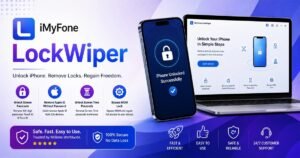
iMyFone LockWiper: Another well-known iPhone unlocking utility, and the user gets directed to those Android product pages as sometimes they show up on the search results.
They are dedicated to providing powerful functions for removing the screen passcodes, Apple ID issues, Screen Time bypassing, and MDM restrictions in the latest iMyFone iOS LockWiper materials.
Screen Passcode Removal
LockWiper provides a workflow designed for users who have forgotten their iPhone screen passcode or are dealing with a disabled or security-locked device.
The software’s advertised process involves connecting the iPhone to a computer and following the appropriate unlocking mode.
As with other screen-unlock tools, users should expect that certain operations may require the device to be restored and therefore may erase its existing contents.
Apple ID-Related Functions
iMyFone also advertises Apple ID removal functions for supported activated devices.
This distinction matters because an Apple Account issue on an activated iPhone is not necessarily the same as an Activation Lock screen after a factory reset.
iMyFone’s own materials indicate that LockWiper’s Apple ID functionality has specific activation requirements.
Screen Time
LockWiper also includes a Screen Time passcode workflow.
This can be useful when the device itself works normally but Screen Time restrictions prevent access to certain settings or features.
MDM
For supported devices, LockWiper also advertises MDM-related functionality.
As with any organization-managed iPhone, however, the proper first step is to determine who owns or manages the device. A company or school administrator may need to remove the management profile legitimately.
Pros
- Multiple iPhone unlocking modes
- Screen passcode support
- Apple ID-related functions
- Screen Time support
- MDM functionality
- Windows-based unlocking workflow
Cons
- Features depend on device and iOS compatibility
- Some operations can erase data
- Apple ID and Activation Lock situations should not be treated as identical
- Users should check the current supported-device list before purchasing
Who Should Use iMyFone LockWiper?
LockWiper is worth considering if you need a broader iOS unlocking utility and your particular problem involves a screen passcode, Screen Time, Apple ID-related restriction, or supported MDM situation.
For an Activation Lock screen, however, carefully distinguish between an activated device with an Apple Account issue and a device that has been reset and remains linked through Activation Lock.
👉 Check iMyFone LockWiper
Which iPhone Unlock Software Should You Choose?
The easiest way to choose is to start with the problem rather than the software name.
| Your Problem | Recommended Starting Point |
| Forgot iPhone passcode | Dr.Fone |
| Disabled iPhone | Dr.Fone |
| Screen Time passcode | Dr.Fone / iMyFone LockWiper |
| Activation Lock | Tenorshare 4MeKey or official Apple support |
| Apple ID-related issue | Dr.Fone / iMyFone LockWiper where supported |
| MDM restriction | Dr.Fone / iMyFone LockWiper where appropriate |
| Carrier/SIM restriction | Check carrier/IMEI-based eligibility first |
| Non-PTA iPhone | Not the same as an iPhone software unlock |
This distinction can save you money.
iPhone Unlock Software vs Non-PTA iPhone
This distinction is especially important for iPhoneInPakistan.com readers.
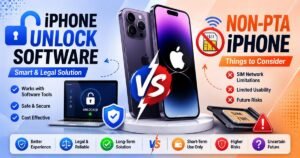
Non-PTA Does Not Mean Locked
A Non-PTA iPhone can be a perfectly functional iPhone.
The device may connect to Wi-Fi, run apps, take photos, record videos, play games, and use other features normally.
The issue is its eligibility for cellular network use in Pakistan under the country’s device registration framework.
Therefore:
Non-PTA ≠ locked iPhone
You generally should not buy iPhone unlock software simply because your iPhone is Non-PTA. Instead, check the device’s IMEI and PTA registration status and understand the applicable registration requirements.
This distinction is particularly useful for people searching for:
- Non-PTA iPhone unlock
- iPhone unlock software Pakistan
- iPhone unlock tool Pakistan
- iPhone software unlock
- iPhone unlocker Pakistan
These searches can refer to completely different problems.
If the issue is PTA registration, the relevant solution is a PTA/IMEI process rather than screen-unlock software.
To understand, check out the PTA TAX guide and each iPhone PTA TAX here.
Is iPhone Unlock Software Safe?
The answer depends heavily on the software, the source you download it from, and the type of unlocking operation you perform.
- No third-party unlocking tool should be treated as risk-free.
- Before using any software, follow these precautions.
Download From the Official Developer
Avoid cracked versions, modified installers, and random download websites. Apart from legal and licensing concerns, modified software can expose your computer or phone to security risks. Use the developer’s official website whenever possible.
Check Compatibility
Do not assume that software supporting “iPhone” supports every iPhone.
Check:
- iPhone model
- iOS version
- Lock type
- Windows or Mac requirement
- Jailbreak requirement
- Data-loss implications
Compatibility can change as Apple releases new iOS versions.
Back Up Your Data
If you can still access the iPhone, create a backup before performing an unlocking operation.
Some screen-unlock procedures require restoring the device, which can erase its contents.
Understand Data Loss
A tool may advertise unlocking without data loss for one function while another function requires a restore.
- Read the exact documentation for the operation you are performing.
- Do not assume that “no data loss” applies to every feature.
Never Share Your Apple Account Password Randomly
Do not use websites that require you to provide your Apple Account username and password via email, chat, or an unknown online form.
An Apple Account holds a lot of sensitive information and can be linked to personal information (photos, backups, contacts, purchases) among other services.
Be Careful With Activation Lock
It is an anti-theft security feature called Activation Lock. If you bought a second-hand iPhone and it’s still linked to the account of its previous owner and Apple’s support process with proof of purchase from a trader in most cases, the best & safest way is to contact the ex-owner. Only certain requests are eligible for support (and must provide proof of purchase) — Apple specifically mentions an Activation Lock support request.
Understand What Happens After a Bypass
Some third-party Activation Lock processes may have limitations involving cellular service, restarting, resetting, or future activation. This is why a phone that appears “unlocked” should not automatically be treated as equivalent to a normally activated device.
Frequently Asked Questions
What is the best iPhone unlock software?
There is no single tool that is best for every type of iPhone lock.
For a broader range of supported iOS unlocking functions, Dr.Fone – Screen Unlock is a strong option. For a specific Activation Lock situation, Tenorshare 4MeKey is more specialized. iMyFone LockWiper is another broad utility covering screen passcodes, Apple ID-related functions, Screen Time, and MDM on supported devices.
Can iPhone unlock software remove a forgotten passcode?
Some third-party tools advertise screen-passcode removal for supported iPhones.
However, the process can require restoring the device, which may erase its existing data. Always back up the phone first if you still have access to it.
Can iPhone unlock software remove Activation Lock?
Some third-party tools advertise Activation Lock-related bypasses for specific devices and iOS versions.
However, Activation Lock is an Apple anti-theft security feature. If you legitimately own the device and have proof of purchase, Apple’s official support process should be considered first.
What is the best software for an iCloud-locked iPhone?
For an iPhone specifically showing an Activation Lock screen, Tenorshare 4MeKey is positioned as a specialized option. However, compatibility and post-process limitations should be checked carefully.
If you have proof of purchase, Apple provides an official Activation Lock support request.
Can I unlock a Non-PTA iPhone with software?
No—not in the sense of solving the PTA registration issue.
A Non-PTA iPhone is not necessarily locked. Its cellular limitations in Pakistan are a separate matter from a forgotten passcode, Apple Account restriction, or Activation Lock.
Is iPhone unlock software free?
Some products offer free downloads, trials, or limited features, but full unlocking functions may require a paid license.
Be particularly cautious of websites promising a completely free “universal iCloud unlock” because the advertised service may not work as claimed or may create security risks.
Does unlocking an iPhone erase its data?
It depends on the type of lock and the operation.
Screen-passcode removal often involves restoring the device, while some other advertised functions may claim to preserve data.
Always read the specific product instructions before starting.
Can iPhone unlock software remove a carrier lock?
Some products advertise SIM or carrier-unlocking functions, but carrier restrictions are different from an iPhone screen passcode or Activation Lock.
Carrier unlocking can depend on the carrier’s policies and the device’s eligibility. Check with the original carrier before paying for third-party software.
Is iPhone unlock software safe?
Reputable software downloaded from the developer can be safer than cracked or modified versions, but no third-party unlocking process should be considered automatically risk-free.
Check compatibility, back up your data, understand possible data loss, and avoid sharing Apple Account credentials with unknown services.
Final Verdict: Which iPhone Unlock Tool Is Best?
The right choice depends on what is actually locked.
Dr.Fone – Screen Unlock is the strongest all-round option in this comparison because it covers several different iOS lock categories, including screen passcodes, Screen Time, Apple ID-related functions, MDM, and advertised Activation Lock-related functionality.
Tenorshare 4MeKey is more specialized. It is primarily relevant to users dealing with Activation Lock situations, but its compatibility and potential limitations make it important to check the exact device before purchasing.
iMyFone LockWiper is another broad iOS unlocking utility, particularly for screen passcodes, Apple ID-related issues, Screen Time, and MDM on supported devices.
Most importantly, do not confuse an iPhone lock with a Non-PTA restriction. If your iPhone works normally over Wi-Fi but cannot be used on Pakistani cellular networks because of PTA registration requirements, an unlock program is not the solution.
And if an Activation Lock belongs to a legitimately purchased second-hand iPhone, check with the previous owner or Apple first. Apple’s current support documentation provides an official Activation Lock support route for users with proof of purchase.
The safest approach is simple: identify the lock first, verify compatibility second, back up your data third, and only then choose the appropriate tool.
Read More:
